
API Explorer
Metaforce API Explorer is a built-in Postman-style REST client designed specifically for Salesforce developers and administrators. It allows you to directly construct, test, and debug Salesforce REST, Tooling, Composite, and UI API endpoints without configuring third-party API clients or managing OAuth headers manually.
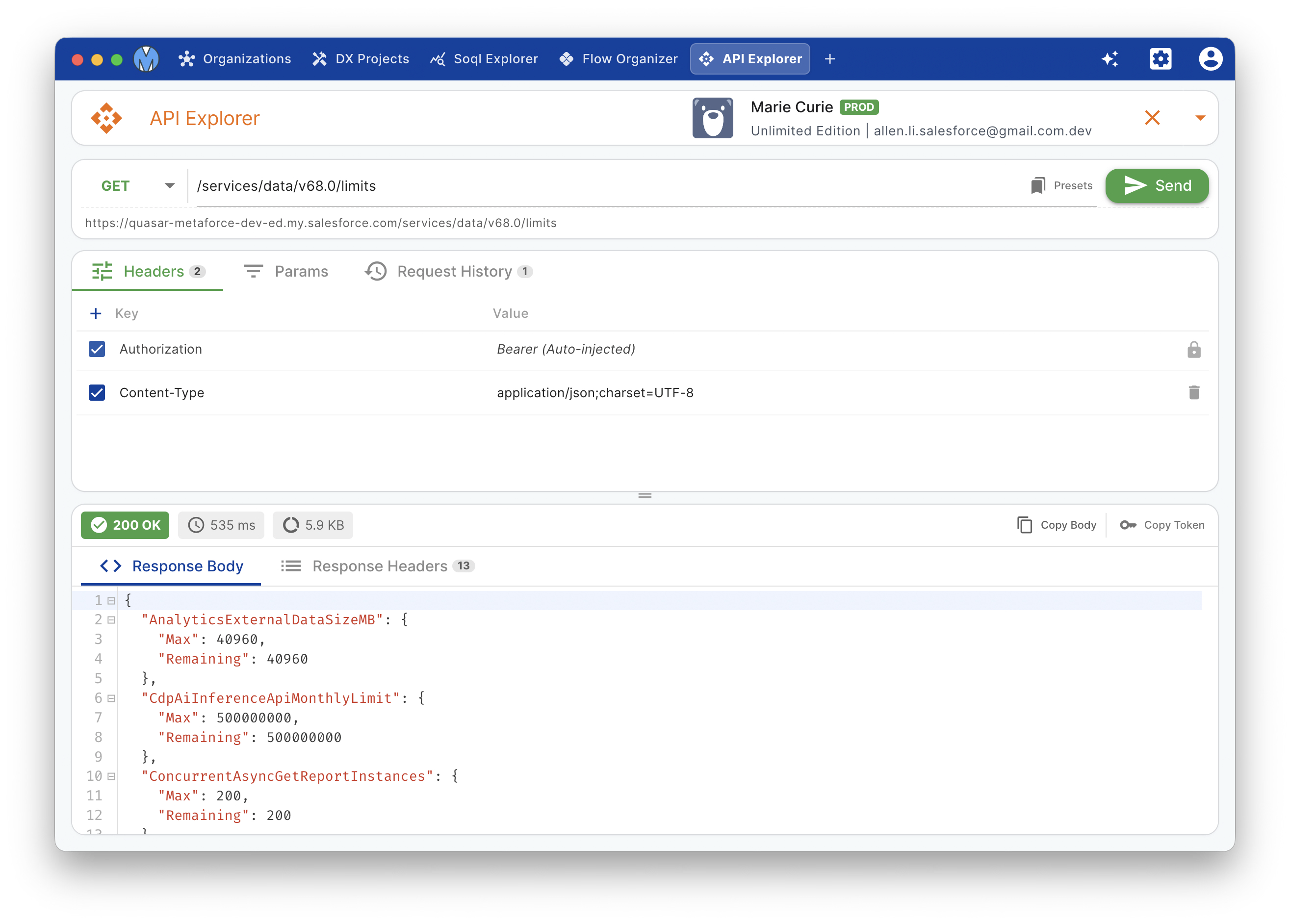
Core Capabilities
- Zero-Config Salesforce Authentication: Automatically inherits active session tokens and custom domain endpoints from your connected organizations. No manual bearer tokens or environment variables needed.
- Rich Endpoint Presets: Comprehensive pre-built templates covering REST, Tooling, Composite, and User Interface APIs.
- Multi-Method Support: Full support for standard HTTP verbs:
GET,POST,PATCH,PUT,DELETE, andHEAD. - Intelligent Response Viewer: Formatted JSON response tree, raw text view, response headers inspection, status codes, and execution duration in milliseconds.
- Request History & Favorites: Search, inspect, and replay previous API invocations with one click.
- Built-in JSON Beautifier: Auto-format request and response payloads via integrated Prettier JSON formatting.
Sending API Requests
1. Select Organization & Method
Choose your target Salesforce organization from the top-right org selector. Metaforce dynamically resolves the active instance URL and API version. Select the HTTP method (GET, POST, PATCH, etc.) for your operation.
2. Enter Endpoint Path
You can type relative paths directly (e.g. /services/data/v61.0/sobjects/Account/describe) or pick from the preset directory.
Preset Directory
Click the Presets button in the address bar to open categorized templates. You can search by keyword (e.g., crud, composite, limits, tooling) or use keyboard navigation (Up / Down / Enter).
3. Configure Headers, Parameters & Body
- Params: Easily define URL query parameters (
q,fields, etc.) without manual URL encoding. - Headers: Add custom headers such as
Sforce-Auto-Assign,Sforce-Query-Options, or customContent-Type. - Body: Write JSON payloads with syntax highlighting and automatic formatting.
4. Execute & Inspect
Press Send or use keyboard shortcut Cmd/Ctrl + Enter. Metaforce displays:
- Status Code & Badge: e.g.,
200 OK,201 Created,400 Bad Request. - Execution Latency: Accurate round-trip timing (e.g.,
185 ms). - Response Payload: Formatted JSON viewer with copy-to-clipboard and collapsible nodes.
- Response Headers: Complete HTTP response headers returned by the Salesforce server.
Common API Presets
The API Explorer includes curated presets for day-to-day development:
| Category | Typical Presets | Purpose |
|---|---|---|
| REST API | Org Limits, Describe Global, SObject Describe, SObject Rows (CRUD), Recent Items | Query org limits, inspect object schemas, and create/update records directly. |
| Tooling API | Execute Anonymous, ApexClass, CustomField, ApexExecutionOverlayResult | Compile dynamic code or query developer metadata. |
| Composite API | Composite Batch, Composite Tree, Composite Graph, SObject Collections | Execute up to 25 subrequests in a single HTTP call to eliminate governor limits. |
| UI API | Record UI, Object Info, Layout | Fetch complete layouts, picklist values, and schema metadata optimized for frontend UI. |
Request History
Metaforce automatically keeps track of your recent API requests per organization.
- Click the History button to open the history drawer.
- Search requests by endpoint path or HTTP method.
- Click any entry to restore the complete request configuration (method, URL, headers, and body) for instant re-execution.